Reading the PO Overview
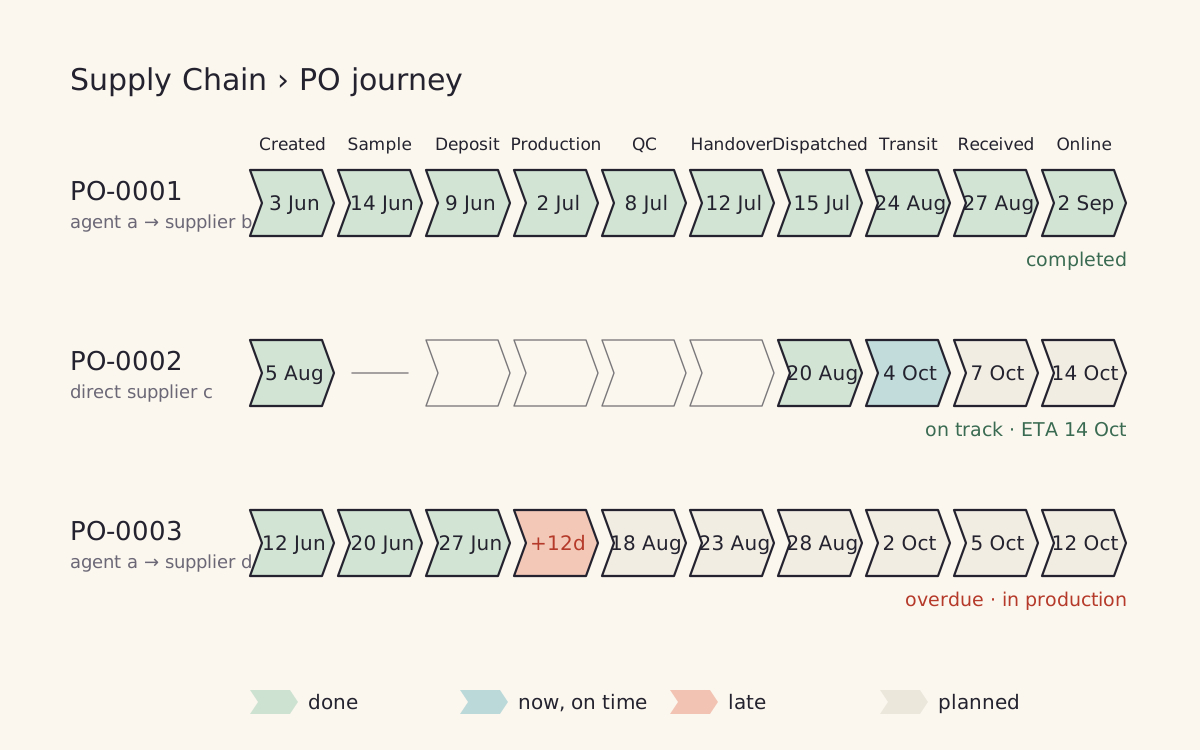
What is on the board
Every order that is still on its way is on the board:
- Orders to direct suppliers.
- Orders between AW companies, for example one company buying from the factory.
- Orders through agents. An order through an agent is placed for one supplier behind the agent, because that is where production, quality checks and delays really happen. Its row shows the agent and the supplier.
An order leaves the board once its goods are placed in the warehouse and every product from it is on sale. Orders finished in the last 60 days stay visible as Completed, so you can see what came in. Orders more than a year old that never finished are set aside and do not show.
The stages
The board uses the same stages as the purchase order page, plus a last column for the products going online. Stages 1 to 5 are the agent's side of the work, on orders through an agent.
| Stage | Done when |
|---|---|
| 1 PO Launch | The order is sent to the supplier or agent. This is day zero. A draft is not sent. |
| 2 Deposit & Go | The supplier has the deposit. |
| 3 Making It Happen | The supplier starts making the goods. The sample is approved before that, on new products. |
| 4 Ready to Roll | The goods are made and the quality check is approved. The final checks (balance, packing, QC, compliance) show under the stage. |
| 5 Clean Hand Over (CHO) | The agent has passed the goods on. What that means depends on the agent, see below. A dispatched shipment always completes it. |
| 6 Homeward Bound | Every shipment of the order has left and arrived at the port. |
| 7 Counted & Costed | Every shipment of the order is received at our warehouse. |
| 8 Mission Complete | Every product from the order is created and on sale on the website. |
Clean Hand Over is set per agent. For an agent that sends goods on its next container (China, Indonesia), it is done when every item of the order is on a shipment. For an agent that hands goods to a shipping agent (India, Nepal), it is done when the agent records Handed over. Each agent can also have its own name and description for any stage, its own target days, and the final checks it shows: see the wayfinder below.
Not every order goes through every stage. Orders between AW companies go straight from submitted to the hand over. Orders to direct suppliers show a deposit only when one is set, and production only when the supplier takes production days. A column an order does not use shows as a thin line. The sample approval and the clean handover are steps inside their stage: they show on the order page, not as columns here.
Reading the colours
- Green with a date: done on that day.
- Pale green tick: done, but nobody recorded the date. A later stage happened, so this one must have.
- Blue: the stage the order is on now, and it is on time. The date is its target.
- Amber: the current stage is due within three days.
- Red with +N days: the current stage is late by that many days. There is only ever one red cell per order: the stage it is stuck at.
- Grey date: the plan for a later stage. Struck through means that plan date has already passed while the order is stuck earlier, so the order will be late there too.
- Blank: a stage nobody has recorded on this order yet. See below.
The status column on the right says the same thing in words: On track with the expected finish date, or Overdue with what the order is waiting for, for example Waiting for hand over or Not sent yet.
Where the targets come from
Each stage gets a number of days after the stage before it actually finished. So if production finished two weeks late, QC is measured from the day production really finished, and the red lands on the stage that slipped, not on everything after it.
The days come from, in this order:
- Dates agreed on the order. An estimated production date, an arrival date on the order or on its shipment, or the agent's approved ready date. When an arrival date is known, the hand over is due the transit time before it. When a ready date is agreed, QC is due that day and the clean hand over within seven days of it, as in the agent agreement.
- The agent's own stage days, if set on the agent's page.
- The agent's or supplier's delivery time, spread across the stages. Each agent's delivery time is set to how fast 80% of their past orders arrived, so red means slower than usual for that agent.
The stages nobody else records
The system sees for itself when an order is sent, when goods leave and are received, when they are placed, and when products go online. The port arrival is entered on the shipment's customs panel. It cannot see when a deposit is paid, production starts or the goods pass the quality check. Somebody has to mark those.
- The deposit is the first payment recorded on the order, with its bank statement.
- Agents mark production started, production done and handed over on their own orders.
- Buyers can mark every stage, and they alone approve the sample, the ready date and the QC. Approving the QC releases the balance payment.
Until any of these is marked on an order, its cells stay blank and the order is followed on shipping and arrival only. Once one is marked, the order waits at the next unmarked stage, so start from the first one and keep going.
To mark a stage, click its cell, check the date and click Mark done. Clear removes a date entered by mistake. Stages go in order: a date more than a day in the past, a stage marked before the one before it, or clearing a date asks for a reason, which is kept in the order's history with who made the change.
Filters and numbers
The tabs split the orders into Open, Needs action (at risk or overdue) and Completed in the last 60 days, each with its count. Below them a search box for the PO, supplier, agent or buyer, and the dropdowns Organisation, Buyer, Agent, Country, Current stage, Status, Supplier, Journey (agent, direct supplier, between companies) and PO type (NPO is an order with at least one product we have never received before; everything else is a reorder). Reset filters clears them. Sort puts the orders needing action first, the newest, the oldest or the highest value first; Rows per page is at the bottom.
Each row shows the order's value in pounds at today's exchange rate and its Age, the days since Day Zero. The arrow at the start of a row opens what the order is waiting for, its target, the final checks on Ready to Roll and a button to mark the stage; Expand all opens every row. Urgent blockages on the right groups the late orders by what they are waiting for; click one to see them.